
5 Signs That a CIJ Printer Needs Attention
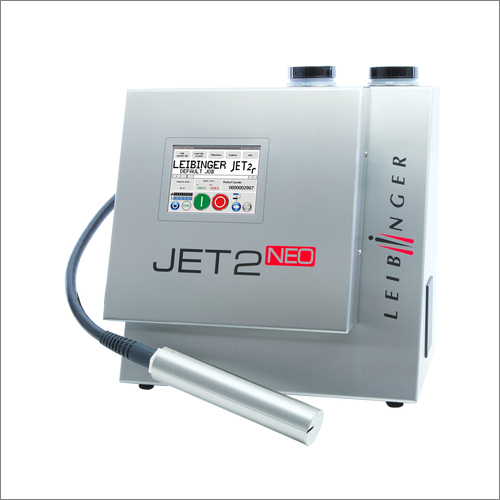
A continuous inkjet printer applies identification information, such as barcodes, expiration dates, lot codes, or other printed messages directly to products or packaging. When its performance changes, manufacturers need to understand what to report and how to arrange support.
Five signs to watch for include a lit service indicator, inconsistent printing, recurring error messages, startup issues, and unusually high ink consumption. These symptoms may indicate maintenance or troubleshooting needs rather than a confirmed fault. A technician can assess whether industrial inkjet printer repair is appropriate.
All Pro Technical Service provides maintenance, technical assistance, and repair for Leibinger and Linx continuous inkjet printers.
How do I know if my CIJ printer needs maintenance or repair?
An illuminated maintenance service indicator means Preventative Maintenance is due. Printing problems or recurring error messages require further assessment. All Pro Technical Service can review the printer's messages, operating conditions, and service history to recommend appropriate support.
Who provides industrial inkjet printer repair for Leibinger and Linx printers?
All Pro Technical Service provides industrial inkjet printer repair for Leibinger and Linx continuous inkjet printers. Support includes phone assistance, shop evaluation, and on-site repair. Contact All Pro Technical Service with the printer model, serial number, facility location, and reported symptoms to discuss the appropriate service.
1. The Service Indicator Is Illuminated
An illuminated maintenance service indicator means the printer is due for Preventative Maintenance. It is not a repair indicator or an automatic indication that a component has failed.
Review the manufacturer's instructions and note when the printer was last serviced. Follow manufacturer-recommended intervals, while considering production hours, ink type, equipment type, and plant environment.
What to report: The displayed notification, printer manufacturer, model, serial number, and available maintenance history.
2. Codes Are Faded, Incomplete, or Inconsistent
Faded printing, missing characters, smudging, or placement changes warrant assessment. The visible result alone does not establish the cause.
Keep examples of affected printing and describe how they differ from normal output. Note whether the issue affects every product or appears intermittently.
Avoid assuming replacing ink will resolve the problem; use OEM consumables or alternatives recommended by All Pro Technical Service.
What to report: Printing examples, substrate, current ink details, and when the change began.
3. Error Messages Appear or Keep Returning
New or recurring display messages provide information for technical assessment. Record the exact wording rather than summarizing every notification as a printer failure.
Explain when the message appears and whether printing continues. If the same notification returns, note its frequency and any actions already taken.
Follow the manufacturer's instructions for the specific message. Contact All Pro Technical Service when clarification is needed.
What to report: The complete message and the operating conditions when it appears.
4. The Printer Has Difficulty Starting
Discuss startup difficulties with a technician familiar with the printer. A startup problem does not indicate which service or repair is required.
Describe what happens when starting the equipment, including any displayed messages. Explain whether the concern is new or recurring and mention recent maintenance or application changes.
What to report: The startup behavior, printer model, serial number, accompanying notifications, and relevant service history.
5. Ink Consumption Is Higher Than Normally Observed
Report any unexpected change in ink consumption. Increased use alone does not confirm an equipment fault.
Provide context about production hours, printed messages, and any recent application changes. These details help the technician understand the observation without assuming a diagnosis.
Record what changed and when, rather than attempting an unverified adjustment.
What to report: Current consumables, observed usage changes, and production information.
What Should Manufacturers Do Next?
Have the printer manufacturer, model, serial number, and the relevant observations above ready when requesting support. Start with technical assistance by phone. All Pro Technical Service can discuss symptoms, provide troubleshooting recommendations, and share documentation, files, or videos.
Depending on the assessment, support may involve Preventative Maintenance, shop repair, or an on-site visit. Shop technicians evaluate printers and eligible components, while factory-trained technicians travel to customer facilities.
For an overview of maintenance, troubleshooting, and repair options, read what continuous inkjet printer service includes. Contact All Pro Technical Service to discuss the appropriate support for the printer.