


High-Resolution Case Coding
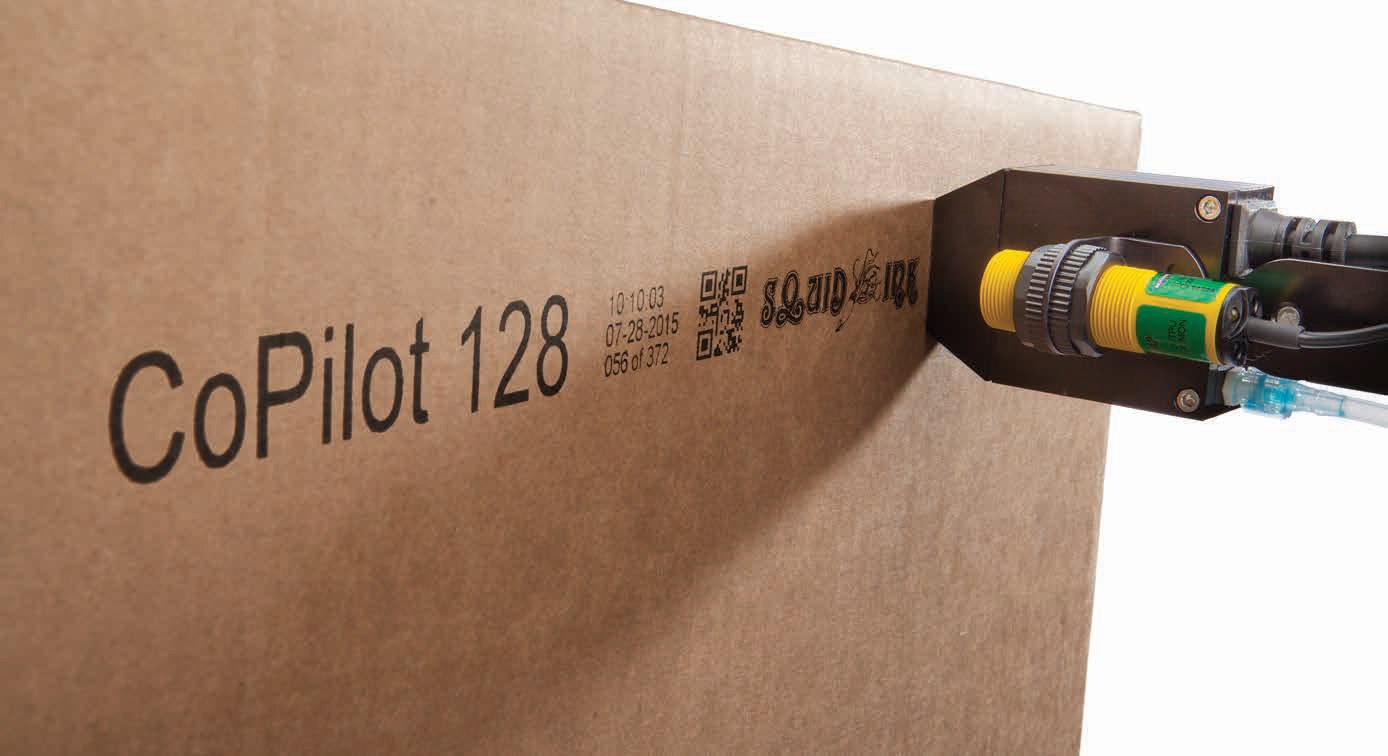
High-resolution inkjet printing applies text, barcodes, logos, and graphics directly to compatible cases and packaging. Manufacturers should select equipment around the complete message dimensions, substrate, ink compatibility, production line speed, and budget.
For Squid CoPilot printers, the required print area is the primary factor in model selection. Barcode performance also depends on message design, packaging characteristics, and consistent case positioning. Equipment selection should also account for ongoing maintenance, consumables, and technical support.
A shipping case carries information that supports identification throughout handling, storage, and distribution. Product descriptions, batch details, and barcodes connect the contents to the information needed downstream.
Applying that information requires more than choosing a printer with the right resolution. The message must fit the case, remain readable, and match the packaged product. Printing must also work within the existing production process.
Manufacturers considering high-resolution inkjet printers should begin with the application. A short identifier has different requirements than a larger layout with a barcode, product description, and logo.
Packaging variations also matter. Different case dimensions, surface treatments, and printing positions may require adjustments to the equipment configuration.
Selecting a printer therefore involves more than comparing resolution or purchase price. Manufacturers should consider the complete message, packaging movement, consumables, and access to technical assistance.
This guide explains the considerations behind direct-to-case printing. It covers message design, substrates, barcode quality, equipment selection, and ongoing support. It also explains how to select Squid CoPilot based on the required print area.

What Is High-Resolution Inkjet Printing?
High-resolution inkjet printing applies controlled ink droplets to create text, barcodes, and graphics on a suitable surface. For case coding, that surface may be an outer panel of a corrugated shipping case.
The printer applies a programmed message as the case passes the printing position. The available message dimensions and operating capabilities depend on the selected equipment configuration.
Understanding Resolution and Print Area
Resolution describes the density of printed dots. Print area describes the space available for the complete message.
CoPilot models and configurations offer maximum print heights ranging from 0.7 inch to 5.6 inches. The available height depends on the model and printhead arrangement. These measurements describe print height; message width must also be assessed.
A case message may combine a product description, barcode, logo and changing production information. Its complete height and width must fit the printer’s capabilities and the usable case panel. The layout must also accommodate the barcode’s required quiet zones.
The required print area is the primary consideration when selecting a CoPilot model. Assessment should begin with the largest message needed for the planned application.
All Pro Technical Service reviews these dimensions alongside packaging samples, ink compatibility, production line speed, print placement and budget. This application review guides the recommended model and configuration.
How Direct-to-Case Printing Works
Direct-to-case printing applies the message to the packaging surface without a separate label.
The case material becomes the background for the printed text and barcode. Its color, coating, and texture therefore deserve attention during application assessment.
Direct printing may suit a complete identification message or selected variable information. Some manufacturers may retain labels for other packaging requirements.
The appropriate arrangement depends on the required content, packaging specification and customer instructions.
Fixed and Changing Information
A case message can contain information that stays the same alongside details that change during production.
A product description may remain fixed for a particular item. A batch reference or production date may change between runs.
Manufacturers should establish how to get changing information to the printer. The selected configuration must support the required message-management process.
What Is High-Resolution Inkjet Used for in Case Coding?
Case coding provides information used to identify and handle packaged goods. The required message depends on the product and its destination.
Common applications include:
- Product names and descriptions
- Item or stock identification numbers
- Batch and lot references
- Production or expiration dates
- Barcodes and corresponding readable text
- Logos and graphics
- Handling and identification messages
These elements should form a clear, organized layout. Adding information without considering available space can make the message hard to read.
Identifying Products in Similar Cases
Manufacturers may use similar cases for several products. Printed descriptions help distinguish the contents without opening the packaging.
For example, identical cases may contain different product sizes or formulations. A readable item description provides an additional reference for identification.
The printing process must connect the selected message with the actual product. A clear code containing the wrong description still creates an identification problem.
Approved messages and defined changeover procedures help maintain that connection.
Applying Variable Data
Variable data printing handles information that changes between production runs or individual cases.
Examples include batch references, dates, and sequential information, where the selected system supports them.
Before choosing equipment, identify the source of each variable field. Some information may require operator entry. Other applications may need a supported connection to another system.
Confirm those functions for the proposed configuration. General variable-data capability does not establish compatibility with every production database or software platform.
Combining Text, Barcodes and Graphics
A case may require readable text alongside machine-readable identification.
A product description, barcode and logo can share the same panel. However, each element needs sufficient space.
The barcode should retain its required dimensions and surrounding clear area. Graphics should stay outside that space.
A complete message example helps define the printing requirements. It also shows whether the available case panel can accommodate the intended layout.
What Types of Cases and Packaging Can Be Printed?
Printing suitability depends on the packaging surface, selected equipment, and ink configuration.
Available Squid CoPilot configurations support different porous and non-porous applications. Compatibility must be assessed for the actual material receiving the message.
Uncoated Corrugated Packaging
Uncoated corrugated packaging suits direct case printing.
However, do not treat cases as identical simply because they share a general material description. Surface color, texture, and consistency may vary.
Manufacturers should provide samples representing their regular packaging. Include variations from different suppliers when they use materials interchangeably.
A packaging change may warrant a printing review even when the case dimensions remain unchanged.
Coated Cartons and Treated Surfaces
Coated or treated packaging requires separate consideration.
The printing surface may absorb ink differently from uncoated corrugated material. Ink selection must reflect that difference.
Provide available material specifications and describe any coating or laminate. Include samples when the surface characteristics are uncertain.
All Pro Technical Service can review the packaging and printing requirements before recommending equipment and ink.
An ink used on one case material should not be assumed suitable for another.

Choosing the Printing Panel
The intended printing panel must be accessible as the case passes the printer.
Review the panel’s dimensions, existing graphics, tape, seams, and folds. Also consider its orientation on the conveyor.
A large panel may contain artwork that restricts barcode placement. A smaller panel may provide a clearer area but require a different message arrangement.
Consider what happens after printing too. Guides, transfers or stacking may bring the printed surface into contact with other materials.
The selected position should support both printing and subsequent handling.
What Should Manufacturers Consider When Choosing a Case Coding Printer?
A useful equipment discussion starts with a complete application description.
Purchasing, engineering, production, and maintenance personnel should contribute relevant information. Their requirements often extend beyond the printer itself.
Required Print Area
The required print area is the primary consideration when selecting a Squid CoPilot printer.
Measure the complete message height and width. Include text, barcode dimensions, graphics, and required clear space.
Also establish:
- The number of printed lines
- The intended case face
- Available space on that face
- Whether multiple faces require printing
- The range of messages used in production
A small product identifier and a larger case message may require different configurations.
Start with the largest required layout within the planned application. This helps avoid selecting equipment around an incomplete example.
Production Line Speed
Review production line speed alongside the message and proposed configuration.
Record normal operating speed and expected variations. Describe case spacing and whether movement remains continuous.
Where conveyor speed changes, discuss suitable synchronization. An encoder may be relevant, depending on the equipment and operating arrangement.
Confirm performance for the proposed message and conditions. A published maximum speed does not establish performance for every layout.
Also describe planned production changes. Equipment selection should account for known requirements rather than an unspecified possibility of future expansion.
Case Positioning and Stability
The case must reach the printing position in a suitable orientation.
Review how cases are guided and whether their position changes between products. Different dimensions may require adjustments to guides or mounting positions.
Check whether the printing panel remains accessible throughout the message application.
For example, a case that turns during a conveyor transfer may require printing at a different position. The equipment discussion should include that movement.
Conveyors and material-handling equipment form part of the overall packaging process. Their arrangement can affect access to the printing surface.
Changeover Requirements
Manufacturers using several case sizes should define the adjustments required between jobs.
The process may involve selecting a message, changing case guides, and repositioning equipment.
Identify who performs these steps and who confirms the first printed case.
A documented changeover should cover both physical setup and message accuracy. Completing one without the other leaves the process incomplete.
Keep approved message names clear enough to distinguish similar products. This is especially useful when several cases share the same dimensions.
Budget and Ownership Costs
Purchase price is one part of the decision.
Review the proposed equipment alongside installation, accessories, ink requirements, operator instruction, and ongoing service.
Consider the time needed for routine care and changeovers. Establish how technical assistance will be arranged.
Use representative messages when discussing consumable costs. A short identifier and a large graphic involve different printing requirements.
Record the assumptions behind each quotation. Comparable application information provides a clearer basis for purchasing decisions.
Contact All Pro Technical Service with the message dimensions, packaging details, and production requirements to discuss equipment selection.
High-Resolution Inkjet vs. Other Case Coding Approaches
Manufacturers may use direct printing, labels, preprinted cases, or a combination of these methods. Assess each approach against the required information and packaging process.
| Approach | Application questions to review |
|---|---|
| High-resolution direct-to-case inkjet | Which CoPilot configuration provides sufficient print area for the complete case message, including barcodes, text and graphics? |
| Print-and-apply labeling | Is a separate label required, and can the label format and application process meet the packaging requirements? |
| Preprinted cases with additional variable coding | What information remains fixed, and what changes during production? |
| Thermal inkjet printing | Does the proposed configuration cover the required message dimensions, substrate and operating conditions? |
| Continuous inkjet printing | Is the requirement a small code on an individual product, or a case message that fits the proposed Leibinger printer’s capabilities? |
Direct Printing and Print-and-Apply Labels
Direct printing uses the case surface as the message background. Print-and-apply uses a separate label.
That distinction matters when reviewing barcode contrast, placement and available space.
Some customers may specify a label format or require information on a particular surface. Other applications may allow direct printing.
Before replacing an existing label, identify every function it serves. Include readable information, barcode requirements, graphics and placement instructions.
A manufacturer may retain labels for one purpose while using direct printing for another. The packaging specification determines the arrangement.
Preprinted Cases With Variable Coding
Preprinted cases can carry information that remains fixed. Additional coding can apply changing production details.
A manufacturer may also consider printing more information during packaging.
Review which details remain common across products and which change frequently. Include packaging inventory and message-management requirements in the comparison.
For example, a shared case design may still need different product descriptions during production. The printing setup must accommodate those differences.
Avoid assuming that either approach always reduces operating costs. The result depends on the actual purchasing and production process.
Thermal Inkjet and Continuous Inkjet Options
Assess other inkjet approaches based on their proposed configurations.
For thermal inkjet printing, establish whether the available print area covers the full case message. Do not assume that every configuration accommodates a larger barcode-and-text layout.
For continuous inkjet printing, review the required message size, substrate and production conditions.
All Pro Technical Service can help manufacturers compare printing options around their application. Squid CoPilot high-resolution printers support case-coding requirements involving text, barcodes, logos, and graphics.
The selection should reflect the complete printing task.
How Print Quality Affects Barcode Readability
Scannable barcodes depend on more than a printer’s resolution.
The printed symbol must use appropriate dimensions, sufficient contrast and the required clear space. It must also contain the correct information.
Barcode Dimensions and Quiet Zones
A barcode’s size should reflect the selected symbol and its application requirements.
Quiet zones are the clear areas surrounding the symbol. Text, graphics or case artwork should not intrude into those spaces.
Plan the barcode within the complete message layout. Allow room for readable information without reducing required clear areas.
If the message exceeds the available print area, reassess the configuration. Shrinking the barcode just to fit may compromise the intended application.
Contrast and Printed Quality
The ink and packaging background determine the appearance of the finished symbol.
Assess the barcode on representative case material. A layout on a computer screen does not reflect the final printed result.
Review completeness, printed edges and placement. Include packaging variations used during regular production.
Existing artwork deserves attention too. A suitable printing area should provide the background required by the barcode application.
Changes to packaging color or surface treatment may warrant another assessment.
Scanning and Formal Verification
A successful scan confirms that a particular scanner decoded the symbol under those conditions.
Formal verification provides a broader assessment against applicable barcode requirements. Manufacturers should establish their customer’s requirements before approving the printing setup.
Where verification is required, include it in the acceptance process. Do not rely solely on a visual check or one successful scan.
Correct Data and Production Checks
Print quality and data accuracy require separate checks.
A readable barcode can contain an incorrect item number. A clear product description can also belong to the previous production run.
Confirm the encoded information and accompanying text against the packaged product.
Define checks at startup, message changes and packaging changes. Establish who responds when a printed case does not meet requirements.
For related application information, see All Pro Technical Service’s barcode printing solutions.
Ink and Substrate Considerations
Ink selection connects the printing equipment with the packaging surface.
Review the proposed printer, ink, and case material together. Their compatibility affects whether the message meets the intended requirements.
Selecting Appropriate Consumables
Manufacturers should use OEM consumables or alternatives recommended by All Pro Technical Service.
Describe the packaging surface and provide available specifications. Identify coatings or treatments that may affect printing.
All Pro Technical Service can review the substrate and application when discussing suitable consumables.
Do not select ink solely from a broad compatibility description. Confirm its suitability for the actual printer configuration and packaging.
Handling After Printing
Describe how the case moves after receiving the message.
It may pass through guides, transfer between conveyors or enter a stacking process. The printed panel may contact other cases or equipment.
Assess representative printed samples under relevant handling conditions.
A message inspected at the printing position may look different after subsequent contact. The evaluation should reflect the process the case actually follows.
This also helps establish an appropriate printing location.
Managing Material Changes
Treat packaging and ink substitutions as changes requiring review.
A replacement case may use a different surface treatment even if it looks similar. An alternative consumable may require separate approval.
Maintain a record of approved combinations. Identify who can authorize substitutions and how production personnel receive that information.
Purchasing and production should share relevant packaging specifications. This helps prevent an unreviewed material change from reaching the printing station.
Planning Ink Supply
Establish a replenishment process around actual production demand.
Record the approved ink reference and ordering contact. Follow the applicable storage and handling instructions.
Keep consumable identification clear at the printing station. Where several printers use different inks, distinguish their requirements.
Supply planning should form part of routine production management. Confirm availability and ordering arrangements with All Pro Technical Service.
Maintenance and Ongoing Support
High-resolution inkjet printers require care appropriate to the selected model, ink, and environment.
Routine procedures should follow the manufacturer’s instructions and recommendations from All Pro Technical Service.
Routine Operating Care
Operators need accessible instructions for startup, shutdown, and routine care.
Identify approved materials and explain which tasks require technical assistance. Include the procedure for reporting a warning or incomplete message.
The surrounding plant environment also matters. Discuss relevant dust, temperature, and operating conditions when selecting equipment.
Keep instructions specific to the installed printer. Maintenance procedures for another technology should not be transferred automatically.
Preventative Maintenance and Repair
Preventative Maintenance follows the manufacturer’s recommended service intervals.
Scheduling also considers usage, ink type, operating conditions, and plant environment.
Repair addresses a diagnosed fault requiring corrective work. An incomplete message or warning needs assessment before determining the appropriate response.
The symptom alone does not establish which component requires attention.
Discuss the maintenance requirements for the selected CoPilot configuration. This helps manufacturers plan responsibilities and arrange support.
Information Needed for Assistance
When requesting service, provide:
- Manufacturer
- Model
- Serial number
- Exact displayed message
- Description of the symptoms
- Relevant photographs or printed samples
- Recent packaging, ink or message changes
If no message appears, state that clearly.
Also explain when the issue occurs. A problem affecting one case size will show different information than one affecting every job.
Access to Technical Support
All Pro Technical Service can provide technical assistance by phone.
Support may include troubleshooting recommendations, documentation, files and videos. An onsite visit is not always necessary.
The next step depends on the printer and issue.
Review support arrangements before purchasing equipment. Clear procedures help personnel respond when packaging line downtime interrupts production.
Choosing the Right Squid CoPilot for the Application
The required print area is the primary consideration when selecting a Squid CoPilot high-resolution inkjet printer.
Message dimensions, barcode size, graphics, and the number of printed lines help define printing requirements.
All Pro Technical Service can guide manufacturers to a CoPilot model that fits their application. Selection also considers packaging material, ink compatibility, production line speed, print placement and budget.
A complete message example provides a useful starting point. Include the intended printing panel and any case variations used in production.

Create a Message Specification
Prepare an approved example showing every required element.
Include:
- Overall message height and width
- Number of text lines
- Barcode type and dimensions
- Required quiet zones
- Logo or graphic dimensions
- Fixed and changing information
- Intended printing position
Use the largest required layout within the planned product range.
Selecting equipment around a smaller example may overlook another message already needed in production.
Compare the Complete Configuration
After establishing print area, review the substrate, ink, production line speed and case presentation.
Discuss whether one or more printheads are required. Confirm how the proposed arrangement covers the intended message or case faces.
Also review mounting space, controls and supported message-management functions.
Features available on one CoPilot configuration should not be assumed across the range. Ask for specifications covering the actual proposal.
Make Acceptance Requirements Clear
Document what the proposed system must accomplish.
The review should include the complete message on representative packaging under relevant operating conditions. Barcode assessment should follow the customer’s applicable requirements.
Record any planned packaging or production changes that the configuration must accommodate.
This creates a clearer basis for selection than choosing solely from a model name or resolution figure.
Contact All Pro Technical Service with the message dimensions, substrate and production details to discuss an appropriate CoPilot configuration.
When Should a Manufacturer Review Its Current Case Coding Setup?
Reassess an existing setup when application requirements change or recurring problems affect production.
Packaging or Message Changes
New case dimensions, coatings, or graphics can affect the printing process.
Additional text or a larger barcode may also exceed the existing print area.
Review the complete message before reducing elements to fit. Determine whether the current configuration still meets the updated requirements.
Production Changes
Changes to production line speed, spacing, or conveyor arrangements can alter case presentation.
Include the printing position when assessing upstream or downstream equipment changes.
Confirm that cases still reach the printer in the required orientation. Review any new product-specific adjustment requirements.
Recurring Quality Problems
Repeated incomplete messages, inconsistent placement, or barcode concerns warrant a structured assessment.
Record which cases and messages are affected. Note when the problem occurs and any recent changes.
Review equipment, consumables, message design, and case handling together.
Replace equipment only after assessing the actual problem.
Difficult Changeovers
Frequent adjustments or uncertainty about message selection may indicate a process requiring attention.
Review template names, operator instructions, and physical setup requirements.
Clearer procedures may address part of the issue. Equipment changes may be appropriate where the existing configuration cannot accommodate the application.
How All Pro Technical Service Supports Case Coding Applications
All Pro Technical Service is a family-owned distributor and service provider based in St. Charles, Missouri.
The company sells, services, and supports industrial coding and marking equipment, backed by decades of technical expertise.
Case-coding discussions begin with the packaging, required message, and production conditions.
Application guidance can include:
- Required print area
- Squid CoPilot selection
- Substrate and ink compatibility
- Production line speed
- Print placement
- Material handling
- Routine care and technical support
Related stands and system accessories may be included in the installation. Their suitability depends on the selected equipment and printing position.
Personalized support includes assessing the underlying problem when assistance is needed.
Request a Quote from All Pro Technical Service to discuss high-resolution case coding. Provide a sample message, packaging details, and production requirements.
Frequently Asked Questions
What information is needed to choose a Squid CoPilot printer?
Start with the complete message height and width. Include barcode dimensions, graphics, printed lines and placement. All Pro Technical Service also reviews packaging material, ink compatibility, production line speed and budget.
Does higher resolution guarantee scannable barcodes?
No. Barcode performance also depends on dimensions, clear space, contrast, printed quality and encoded information. Assess representative cases and complete formal verification when required.
Can one printer handle different case sizes?
That depends on the selected configuration and production arrangement. Review the messages, case positions and adjustments required for each size during equipment selection.
How should manufacturers address recurring printing problems?
Provide the manufacturer, model, serial number and exact displayed message. Describe the symptoms and relevant changes. Contact All Pro Technical Service for assessment and appropriate next steps.